A sudden drop in Click-Through Rate is one of the most common, and most misunderstood, problems in Google Ads. You open the account on an ordinary morning and something has clearly changed. CTR has fallen, impressions look different, clicks have declined, traffic feels inconsistent, conversions are fluctuating, and cost per click may have crept up.
The natural reaction is to start changing things: raise the budget, add more keywords, switch from Maximize Clicks to Target ROAS. In my experience, none of that is necessarily the right first move.
In one recent campaign investigation, I approached the problem differently. Instead of asking “how do I increase CTR,” I asked “what changed that caused CTR to fall.” That small shift in framing changed how the whole investigation unfolded, and it’s the approach I use every time now.
CTR Is a Symptom, Not the Diagnosis
CTR is just a ratio: clicks divided by impressions. So when it falls, the real question is what happened to the two numbers underneath it, because the same drop can mean very different things depending on how impressions and clicks moved.
Consider two situations. In the first, a campaign generating 10,000 impressions and 500 clicks (5% CTR) later produces 8,000 impressions and 300 clicks (3.75% CTR). Both impressions and clicks declined, which usually points to a genuine traffic problem.
In the second, the same starting point later becomes 20,000 impressions and 700 clicks (3.5% CTR). CTR fell even more sharply than in the first case, but clicks actually went up. This could simply mean the campaign started appearing for a broader range of searches. A lower CTR here doesn’t automatically mean the ads got worse. It might just mean the audience got wider, which is why the first step is understanding what actually changed, not jumping straight to “the ads must be underperforming.”
Step 1: Start With a Period Comparison
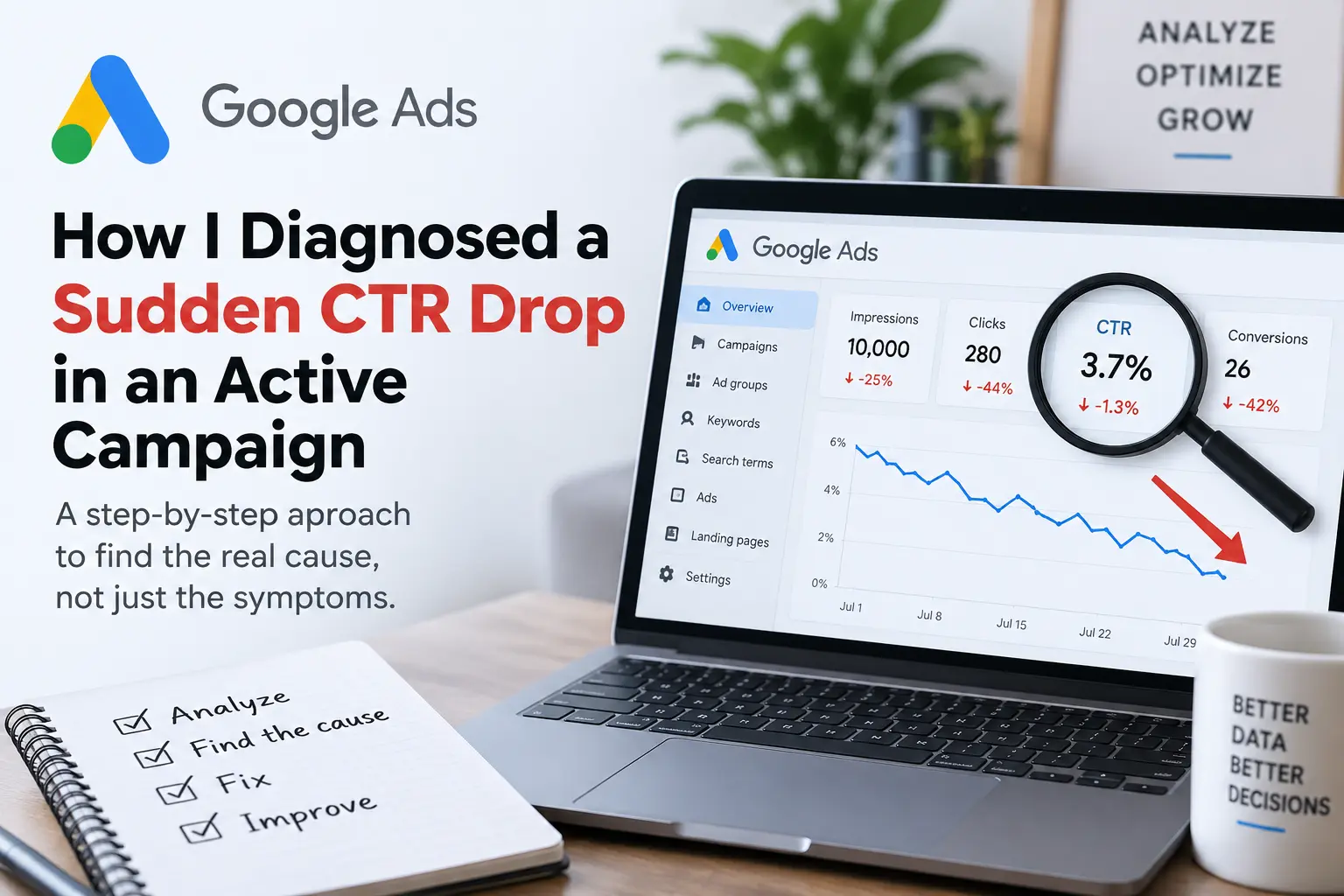
The first thing I did was compare two equivalent time periods rather than looking at today’s numbers in isolation, pulling impressions, clicks, CTR, average CPC, cost, conversions, and impression share side by side to find the first metric that changed meaningfully.
In this case, impressions had dropped from 10,000 to 7,500, clicks from 500 to 280, CTR from 5.0% to 3.7%, average CPC had risen from ₹12 to ₹15, and conversions had fallen from 45 to 26. Once I laid it out this way, the problem looked completely different. It wasn’t a CTR problem in isolation, it was lower visibility, fewer clicks, higher CPC, and fewer conversions all at once, which meant it needed a much more thorough investigation than a quick ad copy tweak.
Step 2: Check Impressions Before Blaming the Ads
Because CTR depends entirely on impressions, that’s one of the first things I check. If impressions have fallen, I look at search demand, budget, bidding, Ad Rank, keyword eligibility, and policy restrictions. If impressions have increased, I look in a different direction: search terms, match types, query expansion, and audience expansion settings. The principle I hold onto is simple: never diagnose a CTR change without looking at impressions and clicks together.
Step 3: Go Deeper — Campaign, Ad Group, Keyword, Search Term
Campaign-level data can hide what’s actually happening underneath, so I moved progressively deeper: campaign, ad group, keyword, search term. The search terms report ended up being one of the most valuable parts of the investigation, because it showed that not all the traffic hitting the account had the same quality. Some searches were highly relevant and commercially valuable; others were generic, competitor-related, coupon-oriented, or completely unrelated to what the business sold.
Step 4: Broad Match Was Expanding Traffic Too Far
One of the strongest findings was that broad-match keywords were pulling in traffic that wasn’t well aligned with the business. Broad match can be genuinely useful when managed carefully, but it also hands Google’s systems a lot of freedom to decide which searches count as related to a keyword’s intent, and that can produce noise as easily as it produces discovery.
In this case, a business advertising natural wellness products discovered that one broad keyword was triggering searches for other brands entirely, unrelated products, coupon queries, and informational searches with no commercial intent. The result was predictable: more impressions, lower relevance, lower CTR, and wasted spend. The fix wasn’t “write a better ad.” It was “stop showing the ad for the wrong searches.”
Step 5: Search-Term Analysis Matters More Than Keyword Volume
One of the biggest lessons here was that having more keywords isn’t the same as having more opportunity. A campaign can have hundreds of keywords and still be full of low-quality traffic. So instead of asking how many keywords the account had, I started asking which actual searches were producing valuable traffic: keep the relevant commercial searches, proven converters, and important brand terms; review the generic, high-cost, low-conversion searches and unproven broad-match expansions; exclude anything clearly irrelevant, like unrelated brands, unrelated products, or inappropriate coupon searches. This isn’t a one-time cleanup. It becomes a continuous habit.
Step 6: Separate Brand and Non-Brand Intent
Another useful discovery was that brand and non-brand searches shouldn’t be lumped together. Brand-only searches, brand-plus-product searches, and generic category searches represent very different levels of intent, and mixing them into one loosely structured campaign makes performance harder to read. Separating them gives far better visibility into CTR, CPC, conversion rate, and the value each segment actually delivers.
Step 7: Don’t Add Keywords Just Because Traffic Fell
This is a trap I’ve fallen into before. When traffic declines, the instinct is often “we need more keywords.” But adding generic keywords can increase impressions, clicks, CPC, and budget consumption without increasing sales at all. Instead, I look for search terms that have already demonstrated strong relevance, good CTR, and a real conversion history, and use those as the foundation for more controlled targeting, sometimes building them into a dedicated non-brand campaign.
Step 8: Check Search Impression Share
Next, I wanted to know whether the campaign was actually losing eligible traffic it should have been winning. Search impression share, lost impression share due to budget, and lost impression share due to rank answer very different questions. A high lost share due to budget means the campaign could receive more impressions if budget allowed it. A high lost share due to rank means the campaign is in the auction but isn’t winning enough visibility. If the problem is budget, raising it may help. If it’s rank, more budget alone usually won’t fix anything.
Step 9: Quality Score as a Diagnostic Tool, Not a Goal
Quality Score gets misunderstood a lot. Its three components, expected CTR, ad relevance, and landing page experience, are useful as diagnostic signals rather than targets to chase directly. Poor expected CTR might mean the ad doesn’t match search intent or competitors have stronger messaging. Poor ad relevance often means the ad group covers too many themes at once. A weak landing page experience usually means the destination doesn’t satisfy what the user was looking for.
Step 10: The Landing Page Is Part of the Ad
An advertisement doesn’t stop working the moment someone clicks it. If someone searches “buy herbal soap online,” and the ad promises “Natural Herbal Soap — Shop Online,” but the click lands on a generic homepage instead of a relevant product page, that’s a weaker experience than a tightly matched path from search to ad to product. I started treating the landing page as part of the advertising system rather than something separate from it.
Step 11: Investigate the Website Itself
This turned out to be one of the most important parts of the whole investigation. A sudden advertising decline can sometimes coincide with a website problem entirely unrelated to the ads account: a security compromise, server issues, DNS or CDN changes, broken redirects, missing resources, or tracking failures. A site can look completely normal to a business owner while Google’s crawlers are hitting errors or tracking scripts are silently breaking.
Step 12: Bring Search Console Into the Investigation
Search Console is normally thought of as an SEO tool, but during a traffic investigation it offers useful clues about the broader website environment. I checked search performance, queries, pages, indexing status, security issues, and manual actions. One unusual search query stood out: unrelated to the business, yet generating a large number of impressions. Rather than assuming it was a fluke, I filtered by that query, found which page Google associated with it, and inspected that URL directly. Query to page to URL inspection to crawled HTML is a genuinely useful trail to follow when something doesn’t add up.
Step 13: A Past Incident Doesn’t Automatically Mean an Active One
This distinction matters. If a site was compromised previously, an odd search query today doesn’t automatically mean it’s still compromised. Here, Security Issues and Manual Actions both showed nothing current, the affected page returned a normal 200 response, and the suspicious terms weren’t present in the crawled HTML, which shifted the diagnosis toward lingering historical signals rather than an active hack.
URL Inspection also showed some page resources weren’t loading properly. These didn’t appear malicious, so I treated it as a separate technical issue, possibly stale plugin URLs or permissions problems, rather than jumping to conclusions. A crawler resource error doesn’t automatically mean a security problem.
Step 15: Don’t Overlook Conversion Tracking
This is one of the most overlooked corners of Google Ads troubleshooting. Automated bidding leans heavily on conversion signals, so if something changes in tracking, purchase events disappearing, duplicate conversions, incorrect values, or missed checkout events, the bidding system reacts accordingly. That’s part of why I don’t jump straight to changing bidding strategy when traffic falls; first I want to know whether Google is receiving accurate signals in the first place.
Step 16: Change One Variable at a Time
It’s tempting, when performance drops, to change everything at once: switch bidding strategies, add new keywords, write new ads, adjust audiences, and raise the budget, all in the same week. That makes diagnosis nearly impossible, because if performance improves you won’t know why, and if it gets worse you won’t know which change caused it. I try to change one major variable at a time whenever I can.
The Real Objective Wasn’t CTR
The problem looked, on the surface, like “CTR is falling.” But the deeper objective was actually “improve the quality of traffic entering the account.” A campaign with 10,000 impressions, 500 clicks, and a 5% CTR isn’t automatically better than one with 6,000 impressions, 300 clicks, and the same 5% CTR, if the second campaign generates meaningfully more sales. CTR matters, but it isn’t the business outcome.
The Diagnostic Framework I Use Now
When I see a sudden CTR decline today, I follow the same sequence every time: compare time periods to pin down when the decline began, check impressions and clicks together, check CPC for auction shifts, check search terms and match types, check impression share to see whether budget or rank is the constraint, check ad quality and landing page relevance, check policy status, check conversion tracking, check the website itself especially after recent technical changes, check the account’s own recent change history, and only then make one controlled change and measure the result.
I think of the whole system as a chain: search demand leads to a query, which triggers a keyword, which serves an ad, which enters an auction, which produces a click, which lands on a page, which may or may not convert, which feeds a value back into automated bidding, which drives the business result. A problem anywhere along that chain can show up looking like a CTR problem on the surface, which is why fixing the visible symptom isn’t always the right fix.
What I Learned
The biggest lesson wasn’t really about CTR at all. It was about diagnosis. When a campaign suddenly changes, the first question shouldn’t be “what should I optimize.” It should be “what changed,” and then work backwards from there. A drop in impressions usually points to a visibility issue that needs investigation. When impressions rise but CTR falls, examine search relevance and audience alignment. If clicks decline while impressions remain steady, review the ads and competitive landscape. Conversion drops despite stable clicks can indicate landing page or tracking problems. Changes in automated bidding often require checking the conversion signals that guide the system.
And if everything shifted right after a website change, investigate the website before assuming the ads account is the problem.
CTR is a useful diagnostic metric, but it was never the diagnosis itself. The best response isn’t to change everything at once. It’s to follow the data upstream and find the first meaningful change. Don’t optimize the metric that’s screaming the loudest, diagnose the system that produced it. Once the root cause is actually identified, the fix usually becomes obvious.