When I first started working with Performance Max, I thought the challenge would be fairly straightforward.
Give Google the products.
- Set a budget.
- Choose the conversion goal.
- Choose a bidding strategy.
- Add audience signals if they make sense.
- Let Google find potential customers.
That was the theory.
The reality was much more interesting.
My first experience with Performance Max taught me that the hardest part of running a PMax campaign isn’t actually creating the campaign. The difficult part is understanding what Google is doing with the freedom we give it — and knowing when to trust the automation, when to intervene, and when the numbers are telling us something isn’t right.
Looking back at the journey, there are several things I would do differently if I were starting again.
I started with a simple idea: let Google find the buyers
The objective was straightforward: sell more products online.
We had a broad range of products, including healthy products such as cow ghee and other natural products. Instead of creating multiple traditional Search campaigns for every possible product and keyword combination, Performance Max looked attractive.
One campaign could potentially reach customers across Google’s ecosystem.
That sounded efficient.
And initially, the numbers looked encouraging.
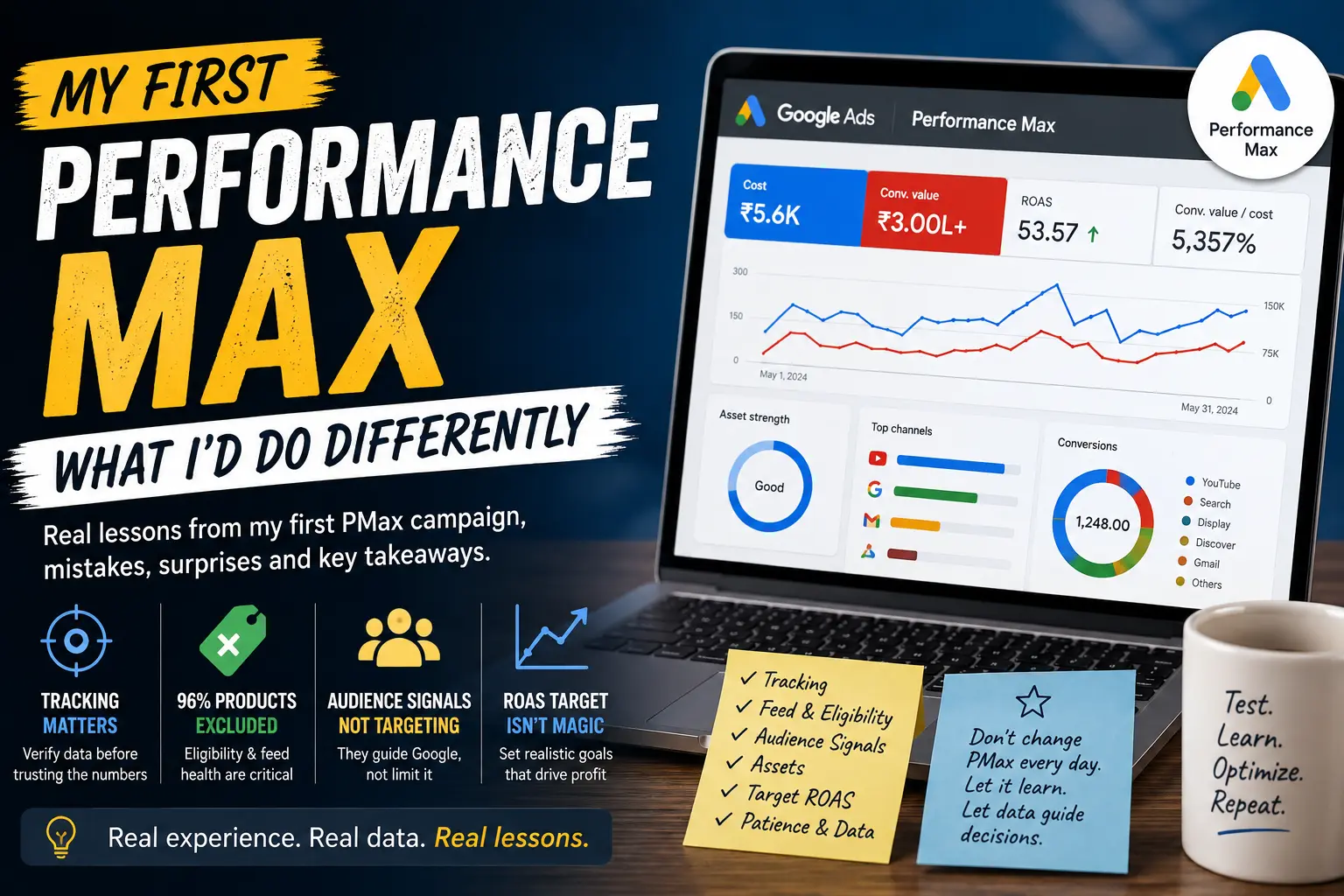
The PMax campaign started generating traffic and conversion value. The campaign showed a strong CTR, healthy conversion rates and, according to Google Ads, a substantial conversion value.
At one point, the campaign was showing a conversion value of more than ₹3 lakh against a spend of around ₹5,600 in the period we were analyzing.
On the surface, it looked fantastic.
But that was when the real learning started.
Lesson 1: A high Google Ads conversion value doesn’t automatically mean high real revenue
One of my biggest lessons from PMax was to stop treating Google Ads conversion value as the same thing as verified business revenue. Our Google Ads numbers were showing considerably more revenue than we could reconcile with WooCommerce and GA4.
For example, Google Ads was reporting significant conversion value from PMax, while the actual WooCommerce revenue wasn’t matching that number.
That immediately changed the way I looked at the campaign.
Instead of asking:
“Why is PMax performing so well?”
I started asking:
“What exactly is Google counting as a purchase, and is the value being reported accurately?”
This was an important shift.
A campaign can appear to have an excellent ROAS if the conversion tracking is inflated, duplicated or incorrectly attributed.
So if I were starting PMax again, conversion tracking would be one of the first things I would validate — before judging campaign performance.
Lesson 2: Don’t give PMax too much freedom before understanding your product feed
Another major surprise came when we discovered that 96% of the products in the catalogue were excluded from the campaign.
That was a wake-up call.
The campaign might look like it was promoting the entire catalogue, but in reality, Google wasn’t necessarily able to advertise most of the products.
This taught me something important:
Campaign configuration and product availability are two different things.
Creating a PMax campaign does not mean all your products automatically become equally eligible to participate.
The Merchant Center feed, product approvals, product data, policy status and campaign configuration all matter.
If I were starting again, I would first create a simple product eligibility checklist:
- Is the product approved in Merchant Center?
- Is the product actually eligible for advertising?
- Is it included in the campaign?
- Is the product information complete?
- Are images and titles strong?
- Is the landing page working?
- Are there policy restrictions?
- Are there products unintentionally excluded?
Only after answering those questions would I judge the campaign’s performance.
Lesson 3: Audience signals aren’t the same as audience targeting
One of the more confusing parts of my first PMax experience was audience signals. I added first-party audiences such as:
- Viewed Product
- Cart Visitors
- Checkout Visitors
- Purchasers
I also added interest-based signals such as:
- Preferences around organic food
- Cow ghee high-intent buyers
Initially, I thought:
“I’m telling Google exactly who I want.”
But that’s not really how PMax works.
Audience signals are signals, not hard targeting boundaries. Google can use them to understand where to start learning, but the system can still find users outside those signals.
That changed how I thought about PMax.
I stopped treating audience signals as a traditional targeting mechanism and started treating them as information I was giving Google’s machine-learning system.
That distinction matters.
Lesson 4: More assets don’t automatically mean better performance
Another lesson came from the asset side.
Google continuously recommended adding more assets and improving asset strength. At different points, we saw recommendations around:
- headlines
- descriptions
- images
- videos
- sitelinks
- logos
- other creative assets
The temptation is to keep adding everything Google recommends.
But I learned to ask:
“Is this asset actually helping the campaign communicate the product better?”
rather than:
“How do I get a higher optimization score?”
That distinction became important. An optimization score is useful as a checklist, but it shouldn’t become the objective.
Sales are the objective.
Lesson 5: Policy problems can quietly restrict a campaign
This was another major part of our PMax journey.
The campaign also encountered policy-related limitations. Some issues involved product or asset eligibility, while another restriction related to personalized advertising and sensitive-interest policy.
We also encountered limitations around assets and audience signals.
This made me realize that a campaign can be technically “enabled” while still not having completely unrestricted delivery.
That’s why I started paying much more attention to:
Campaign status → Asset status → Policy details → Product status → Audience eligibility
Instead of looking only at whether the campaign showed a green enabled indicator. We made changes to the affected assets and appealed the policy decisions. Some appeals were successful, while others failed or required further investigation.
That experience taught me another important lesson:
Don’t keep appealing the same problem without understanding what Google is actually objecting to.
Fix first. Appeal second.
Lesson 6: Don’t keep changing PMax every day
This might be the biggest operational lesson I learned. When a campaign doesn’t immediately behave as expected, the natural reaction is to change something.
- Increase budget.
- Change Target ROAS.
- Add audiences.
- Add assets.
- Change products.
- Modify bidding.
- Change landing pages.
And then wait.
But if you make five changes at once, you don’t know what actually caused the performance change. Our PMax journey taught me to become much more patient.
Google’s own guidance recommends allowing time for campaigns to stabilize after significant changes, so I now avoid judging a major change immediately.
For example, Google later showed a recommendation to review Target ROAS because the campaign had historically achieved a much higher ROAS than its current target.
The numbers looked spectacular.
But I didn’t automatically apply the recommendation.
Why?
Because the objective wasn’t:
“Achieve the highest possible ROAS.”
The objective was:
“Generate profitable sales at useful volume.”
Those aren’t necessarily the same thing.
Lesson 7: A 10,000% Target ROAS sounds impressive — but it isn’t automatically a good target
This was one of the most interesting things I encountered. Google showed extremely high historical ROAS figures for some campaigns.
In our account, Google was showing historical ROAS of around 14,817% for the period we were reviewing, while the current target was 10,000%. It is tempting to look at that and think:
“Amazing. Let’s increase the target.”
A high target can make the system more selective, which may protect efficiency but reduce the number of opportunities available to the campaign.
But I learned not to confuse historical efficiency with the correct future bidding target. A very aggressive ROAS target can make the system more selective. And when the goal is growth, sometimes we need to sacrifice some efficiency to gain additional volume. That’s a lesson I wish I had understood before launching my first PMax campaign.
What I would do differently if I started again
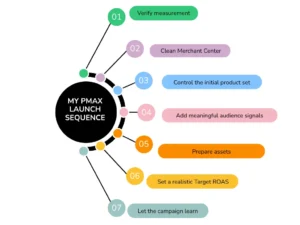
If I were launching PMax today, I would follow a much more disciplined sequence.
Step 1: Fix measurement first
Before spending meaningful money:
WooCommerce → GA4 → Google Ads
I would verify that:
- purchase events fire once
- transaction IDs are correct
- revenue values are correct
- refunds aren’t creating confusion
- currency is correct
- Google Ads receives the correct purchase value
I would establish a baseline from actual WooCommerce revenue.
Step 2: Clean Merchant Center
Before launching:
Product eligibility first.
I would identify:
- approved products
- disapproved products
- excluded products
- missing information
- feed problems
- policy problems
I would not launch a PMax campaign and only later discover that most of the catalogue isn’t actually participating.
Step 3: Start with a controlled product group
I wouldn’t throw the entire catalogue into PMax immediately. I’d start with products that already have:
- proven sales
- reasonable margins
- good product pages
- strong product data
- sufficient demand
Then I’d expand.
Step 4: Build meaningful audience signals
Instead of adding audiences simply because they exist, I’d use signals that reflect actual buyer behaviour.
For example:
Product viewers → Cart visitors → Checkout visitors → Purchasers
Then add relevant interest or intent signals where they genuinely make sense.
Step 5: Create strong creative assets
I’d prepare the assets before launch instead of depending heavily on Google’s recommendations after the campaign starts.I’d make sure the campaign has:
- strong product imagery
- useful headlines
- clear descriptions
- relevant sitelinks
- appropriate logos
- videos where available
- landing pages matching the products
Step 6: Start with a realistic Target ROAS
I wouldn’t set an extremely ambitious target simply because the business wants high ROAS.
I’d look at:
Actual historical ROAS + margin + conversion volume + growth objective.
If the campaign needs to learn, I’d rather give the system a realistic target and sufficient data than force it into an unrealistic efficiency constraint.
The biggest lesson: PMax isn’t a “set and forget” campaign
Before this experience, I thought automation meant less management.
Now I see it differently.
Automation actually requires better management.
Google makes thousands of decisions that we can’t manually control.
So our job changes.
We don’t manage every individual bid. We manage the inputs, constraints, data quality and business economics.
That means monitoring:
Products → Feed → Assets → Audiences → Policies → Conversion tracking → Budget → ROAS → Actual revenue
And then asking whether all of those pieces are telling the same story.
What PMax ultimately taught me
My first experience with Performance Max wasn’t simply about learning how to create a campaign.
It changed the way I think about advertising.
I learned that:
- A high ROAS doesn’t necessarily mean the measurement is correct.
- A large conversion value doesn’t automatically equal real revenue.
- A campaign containing products doesn’t mean all those products are eligible.
- Audience signals aren’t the same as traditional targeting.
- Optimization score isn’t the same as business performance.
- A policy warning shouldn’t automatically lead to another appeal without diagnosis.
And perhaps most importantly:
The more automation we give Google, the more disciplined we need to become about the information we give Google.
If I were starting my first Performance Max campaign again, I wouldn’t try to make Google do everything from day one.
I’d first make sure the data is trustworthy, the products are eligible, the assets are strong, the objective is clear and the budget has a purpose.
Then I’d let the machine learn.
And instead of asking every morning, “How is PMax performing?”, I’d ask a much more useful question:
“Is PMax generating incremental, measurable and profitable business — and can I prove it outside the Google Ads dashboard?”
That is probably the biggest lesson my first Performance Max journey gave me.