For a long time, I treated Google Search Console the way most marketers do — as a health check. Log in, glance at the impressions graph, make sure nothing’s crashed, log out. It felt like a dashboard for reassurance, not a source of insight. That changed the day I stopped looking at the totals and started reading the actual queries people were typing before they landed on a page.
That single shift — from “how many people found us” to “what were they actually trying to do” — changed how I think about SEO, content, and even product marketing. Search Console, it turns out, isn’t really a traffic report. It’s a transcript of thousands of tiny moments of human need, each one typed into a search box with a specific problem in mind. If you’re willing to sit with that data long enough, it will teach you more about your customers than almost any survey or focus group ever could.
This is a walk through what I learned — about search intent, branded versus non-branded behavior, the strange psychology hiding inside click-through rates, and how all of it eventually turns into a strategy instead of just a report you glance at once a week.
1. Understanding Search Intent: The Question Behind the Query
The first real lesson Search Console taught me is that a query is never really about the words in it. It’s a compressed version of a much bigger thought the searcher didn’t have time, patience, or vocabulary to fully write out.
Take a query as plain as “best running shoes for flat feet.” On the surface, that’s a product question. But sit with it for a second, and it starts to reveal itself as something more layered — someone who has probably already tried a pair of shoes that didn’t work, is dealing with some mild discomfort or fatigue, has done at least a little research to learn the term “flat feet” applies to them, and is now looking for validation before spending money again. That’s not a query. That’s a small story with a beginning, middle, and an implied ending they’re hoping you’ll help write.
Search intent is usually grouped into four broad categories, and once I started tagging queries this way in a spreadsheet, patterns started jumping out that I’d been missing for months:
Informational intent—
The searcher wants to learn something, not buy anything yet. Queries like “how does X work,” “what causes Y,” or “difference between A and B” fall here. These searchers are early. They’re not ready for a hard sell, and pages that try to sell too aggressively at this stage tend to underperform, even if they rank well.
Navigational intent —
The searcher already knows where they want to go; they’re just using search as a shortcut instead of typing a URL. This is where most branded queries live (more on that in the next section).
Commercial investigation intent—
The searcher is comparing options. Think “best,” “top,” “vs,” “alternatives to,” or “reviews.” They know they want *something* in a category, but they haven’t picked a specific answer yet. This is often the most valuable stage to intercept, because the decision is genuinely still being made.
Transactional intent —
The searcher is ready to act. “Buy,” “order,” “near me,” “discount code,” “price” — these are people with their wallet basically already out.
What surprised me wasn’t the categories themselves — that framework isn’t new, and most people doing SEO have heard some version of it. What surprised me was how much my own assumptions about which category a query belonged to were wrong, until I actually looked at the data.
I remember one query that, on paper, looked purely informational — a “how to” phrase — that I’d assumed belonged on a low-priority blog post. But when I checked the click behavior and the pages ranking above ours for it, several of the top results were product landing pages, not articles. That was Google quietly telling me something: it had learned, from aggregate click data across millions of searches, that people typing this specific “how to” phrase actually wanted a product, not an explanation. The literal words said “informational.” The real intent, as interpreted by the people actually typing it, was closer to commercial.
That’s the first big lesson Search Console (combined with a healthy look at the actual search results page) taught me: never trust the grammar of a query more than the evidence of what searchers actually click. The words are a rough sketch. The click behavior is the finished drawing.
Reading Intent Signals Directly From Search Console
A few practical signals I started watching for, once I understood this:
- Query length Short, 1–2 word queries tend to skew broad and either navigational or top-of-funnel informational. Longer, specific queries (5+ words) almost always carry stronger, more decisive intent — the person has already done some thinking and is now being precise about what they want.
- Modifier words: Words like “cheap,” “best,” “review,” “vs,” “how to,” “near me,” and “for [specific use case]” are basically intent flags hiding in plain sight inside the Search Console query report.
- Page-query mismatch: When a query is generating impressions on a page that doesn’t actually answer it well, that’s not a keyword you “won” — it’s a gap. Search Console will happily show you high impressions and low clicks for these mismatches, and it’s one of the most underused signals in the whole report.
Once I started sorting queries by these signals instead of just by volume, a strange thing happened: the highest-volume queries were often not the most useful ones. Some low-volume, highly specific queries revealed exactly the kind of customer decision-making I needed to build content and pages around.
2. Branded vs. Non-Branded Queries: Two Completely Different Conversations
If understanding intent was the first lesson, separating branded from non-branded queries was the second — and honestly the one that reshaped how I reported on SEO performance altogether.
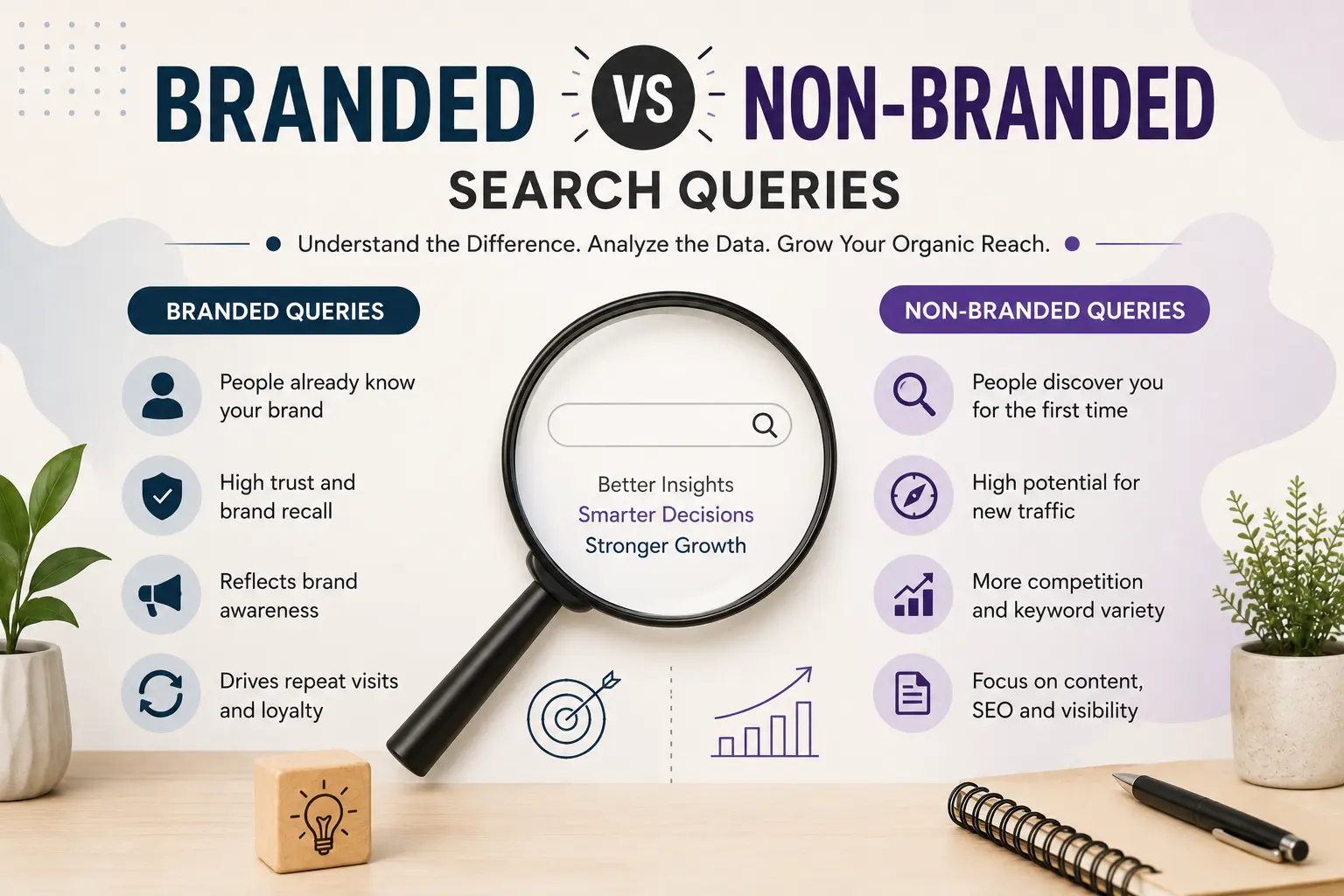
Branded queries are searches that include your brand name, product name, or some clear variant of it (misspellings included). Non-branded queries are everything else — generic terms, category terms, problem-based terms, competitor comparisons that don’t mention you by name.
For months, I’d been looking at “total organic clicks” as one big number, feeling good when it went up and anxious when it dipped. It took embarrassingly long to realize that this one number was actually blending together two audiences with almost nothing in common.
Branded queries represent people who already know you.
They’ve seen an ad, heard about you from a friend, used you before, or are returning customers checking something specific. When someone searches your brand name, they’ve usually already made the “who” decision. They’re just navigating.
Non-branded queries represent people who don’t know you yet.
They’re searching around a problem or a category, and you’re one of several possible answers competing for their click. This is genuine, cold, top-of-funnel discovery.
Here’s the part that reshaped my thinking: a rising trend line in total organic traffic can be entirely driven by branded search growth — meaning more people are searching your name because of offline awareness, ads, or word of mouth — while your non-branded, genuinely new-customer-generating search visibility is actually flat or declining. If you only look at the combined number, you’d think SEO was working. Split it apart, and you might discover your organic acquisition engine isn’t growing at all; you’re just getting better at capturing people who already knew about you.
I started manually tagging query reports into branded and non-branded buckets (using a simple filter that excludes anything containing brand name variants, product line names, and common misspellings), and reporting them as two separate lines instead of one blended metric. The difference in what each line told a story was almost immediate:
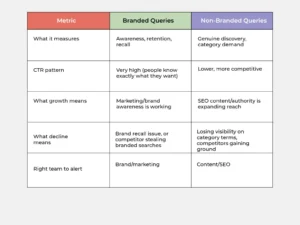
This split also completely changed how I evaluated new content. A blog post or landing page that ranked well and got clicks, but 80% of those clicks came from a branded variant of the query, wasn’t actually proving the content strategy worked — it was mostly riding on existing brand equity. The pages I got genuinely excited about were the ones pulling in clicks on purely generic, non-branded, problem-based queries, because those represented people discovering the brand for the very first time through nothing but the content itself.
A Practical Example
Imagine a hypothetical company selling home coffee equipment. Their Search Console report shows a healthy 40% month-over-month increase in total clicks. Exciting, right? But once split:
- Branded queries (“BrandName espresso machine,” “BrandName reviews,” “BrandName vs [competitor]”) account for 35 of those 40 percentage points of growth — likely driven by a recent influencer mention or ad campaign.
- Non-branded queries (“best espresso machine under $300,” “espresso machine for beginners”) only grew about 5 percentage points.
The honest read here isn’t “SEO is thriving.” It’s “brand awareness is thriving, and it’s spilling into search behavior — but our actual category visibility, the kind that brings in people who’ve never heard of us, has barely moved.” That’s an important distinction for deciding where budget and content effort should go next.
3. CTR Analysis: The Most Emotionally Honest Metric in the Report
If intent tells you why someone searched, and the branded split tells you who they already are, click-through rate tells you something almost embarrassingly honest: whether your listing was actually compelling enough to be chosen over everyone else on the page.
I used to treat low CTR as purely a ranking problem — “we’re just not high enough on the page yet.” Sometimes that’s true. But Search Console taught me that CTR is really a measure of perceived relevance and appeal at a glance, and ranking position is only one input into that.
A few CTR patterns that reshaped how I think about titles, meta descriptions, and even which pages deserve attention:
High impressions, low CTR:
This is one of the most valuable, most overlooked signals in the entire report. It means Google thinks your page is relevant enough to show frequently — but real humans, scanning the results page, are choosing someone else. This is almost never a ranking problem; it’s a messaging problem. The title or description isn’t answering the searcher’s actual question, or a competitor’s listing is doing a better job signaling relevance, freshness, price, or specificity.
Low impressions, high CTR:
This usually means you’re ranking for a narrow, specific, high-intent query — and when you do show up, you’re clearly the right answer. These are often hidden gems: pages that could get more visibility if targeted intentionally, because they’re already proving they convert attention into clicks extremely well once seen.
Position vs. CTR mismatches:
Search Console lets you see average position alongside CTR for the same query, and this pairing taught me more about searcher psychology than any marketing course. A page could sit in position 3 with a shockingly low CTR, while another page in position 6 had a much higher one. The position-3 page usually had a generic, forgettable title. The position-6 page usually had something specific — a number, a year, a direct answer, or language that mirrored the exact way people phrase the problem.
I started running a simple exercise every few weeks: pull the queries with impressions in the top 20% but CTR in the bottom 20%, and manually read the actual title and meta description as if I were a stranger scanning a results page with ten other options open in other tabs. Almost every single time, the underperforming ones had one of these problems:
- The title restated the topic instead of answering the implied question (“Running Shoes Guide” instead of “Best Running Shoes for Flat Feet in 2026, Tested”)
- The meta description was vague corporate language instead of specific, useful information
- The page didn’t signal freshness (no year, no “updated” cue) when freshness clearly mattered for that query
- Competing results had structured data (star ratings, prices, FAQs) creating a visually richer listing, while ours was plain blue text
None of these are ranking problems. They’re all attention and trust problems, solvable without touching a single backlink or piece of technical SEO. That was a genuinely humbling realization — I’d spent so much energy chasing rank improvements when some of the easiest wins were sitting in plain sight as CTR gaps on pages I already ranked well for.
4. Identifying Opportunities: Finding the Gaps Hiding in Plain Sight
Once intent, branded/non-branded splitting, and CTR analysis became habits instead of occasional checks, opportunity-spotting stopped feeling like guesswork and started feeling like pattern recognition. A few specific techniques became part of a regular routine:
The “page two” sweep:
Queries where you rank between positions 11–20 are often the fastest wins available, because you’re already relevant enough to be near the first page, but not visible enough to get meaningful clicks. Search Console makes it easy to filter for average position between 10 and 20, sorted by impressions. These are usually pages that need a moderate content refresh, a stronger internal linking push, or a title rewrite — not a total rebuild.
The “high impression, zero click” queries:
These are the ghosts of the report — queries generating real impression volume but essentially no clicks at all. Sometimes this reveals a query so broad or ambiguous that no single page can serve it well. Other times, it reveals genuine, unaddressed demand: people are searching for something related to your space, and you don’t have any dedicated page answering it directly yet.
Query clustering:
Rather than looking at queries one at a time, grouping similar queries together (all variations of a core question, differing only by phrasing) revealed patterns individual queries never could. A single page often unintentionally targets five or six different phrasings of the same underlying intent. Seeing them clustered made it obvious which pages were quietly serving multiple search patterns at once, and which topics had no dedicated page serving them at all despite consistent, recurring search volume.
Seasonal and trend spikes:
Search Console’s date-range comparisons made it possible to notice queries that spike at predictable times of year, or that show a steady upward trend over several months even at low absolute volume. A slow, steady climb in a specific non-branded query, even from 10 impressions a month to 40, is often worth paying attention to before competitors notice the same trend.
Cannibalization patterns:
Occasionally, two or more pages on the same site were both getting impressions for the same query, splitting authority and confusing which one Google should treat as the “main” answer. Search Console’s per-query, per-page breakdown was the only reliable way to catch this, since it’s invisible from the outside.
The mindset shift here was significant: instead of asking “what keywords should we target,” I started asking “what is Search Console already showing us that we haven’t acted on yet.” Almost every meaningful opportunity I found came from data already sitting there, not from new keyword research tools or competitor spying. Search Console, used properly, is often less about discovering new demand and more about noticing demand you’re already halfway capturing but haven’t fully served.
5. Turning Search Console Data Into an Actual SEO Strategy
Data without a decision-making structure just becomes a folder full of screenshots nobody revisits. The real value came once I built a repeatable process around the analysis instead of treating each session as a one-off investigation.
Here’s roughly the framework that emerged, month over month:
Step 1: Segment before you analyze:
Before looking at any individual query, split the data by branded vs. non-branded, and by page type (product pages, blog/informational pages, category pages). Blended data hides more than it reveals.
Step 2: Score opportunities, don’t just list them:
Every query or page-level insight got a rough score based on three factors — impression volume (is there real demand), intent clarity (do we know what the searcher wants), and current performance gap (position 11–20, or high impressions/low CTR). Anything scoring high on all three moved to the top of the list.
Step 3: Match the fix to the actual problem:
This became one of the most important disciplines. A CTR problem needs a title/meta description fix, not new content. A position-11-20 problem often needs stronger internal linking and content depth, not a rewrite from scratch. A zero-click, high-impression query might reveal the need for an entirely new page. Treating every opportunity with the same “write more content” hammer was a mistake I made early on, and Search Console data is precise enough to tell you which fix actually applies.
Step 4: Build content around clusters, not keywords:
Once query clustering revealed genuine topic gaps, the strategy shifted from “target this keyword” to “build the most useful possible answer to this cluster of related questions,” letting the page naturally rank for the dozens of phrasing variations real searchers were already using.
Step 5: Re-check CTR after every content or title change:
Rather than waiting for a full month of ranking data, checking CTR trends within 1–2 weeks of a title/meta rewrite gave an early read on whether the change actually resonated, long before ranking movement would show up.
Step 6: Revisit branded/non-branded ratio quarterly:
This became a genuinely useful health check independent of raw traffic totals — a rising branded ratio signals brand strength; a rising non-branded ratio signals genuine organic reach expansion. Tracking the ratio, not just the absolute numbers, made quarterly reporting far more honest.
The bigger shift underneath all of this was philosophical: I stopped treating Search Console as a report to check and started treating it as a conversation to have — regularly, and with genuine curiosity about what people were actually trying to figure out when they typed something into a search box. Every low-CTR query, every impression spike, every cluster of oddly related searches became less like “data” and more like listening to a customer thinking out loud, mid-decision, without realizing anyone was paying attention.
-
Real-World Examples (Generalized Patterns)
To make all of this concrete, here are a few generalized, non-company-specific scenarios that reflect patterns I’ve seen repeat across very different kinds of websites.
Example 1: The informational page secretly wanting to be commercial
A generic “how [product category] works” article was ranking on page one for its target query, generating solid impressions but almost no conversions, and the marketing team assumed the topic just wasn’t commercially valuable. A look at Search Console showed the query was pulling in a meaningful volume of additional related searches like “best [product category] to buy” and “[product category] recommendations,” all landing on the same educational page because it was the closest match the site had. Once a dedicated comparison-style section was added directly into that page — addressing the buying decision, not just the mechanism — CTR on the buying-intent variations improved, and the page began contributing to conversions instead of just traffic.
Example 2: The branded surge masking a non-branded decline:
A business ran a successful podcast sponsorship campaign, and total organic clicks jumped noticeably the following month. Leadership was thrilled, assuming SEO efforts were paying off. Splitting the data by branded vs. non-branded told a very different story: branded search volume had roughly doubled (people who heard the podcast ad searching the brand name directly), while non-branded, category-level search visibility had actually dipped slightly due to a recent site restructuring that temporarily hurt some category pages. Without the split, that technical issue would have gone unnoticed for months, buried under an otherwise “good-looking” traffic chart.
Example 3: The page-two cluster nobody had noticed:
A site selling a niche category of home goods discovered, through a simple position filter, that nearly a dozen closely related queries were all sitting between positions 12 and 18 — none individually high-volume enough to catch attention, but collectively representing a meaningful chunk of missed visibility. All of them pointed to a single underlying customer question the existing content only partially answered. A single, more thorough page addressing that cluster directly (rather than a dozen small tweaks) moved several of those queries onto page one within a couple of months, without any new backlinks or external promotion — just aligning existing content authority with a genuine, previously under-served intent cluster.
Example 4: The CTR fix that beat months of content work:
A comparison-style page had been sitting in a respectable position for over a year, generating decent impressions but a CTR well below similar pages on the same site. The page’s title read like an internal product name rather than a searcher’s actual question. Rewriting the title and meta description to directly mirror the phrasing used in the top queries (including a specific number and the current year) led to a CTR improvement within about two weeks — a faster, cheaper win than the content refresh that had been planned as the “real” fix.
Each of these examples shares a common thread: none of them required new tools, bigger budgets, or fundamentally new keyword research. They required actually reading what Search Console was already saying, splitting it into the right categories, and matching the right kind of fix to the right kind of problem.
Lessons Learned
One of the biggest lessons from using Search Console is that rankings alone don’t guarantee success.
Understanding why people search, what they expect to find, and how they respond to your search listing is far more valuable than simply tracking positions.
By studying search intent, analyzing branded and non-branded queries separately, improving click-through rates, and continuously refining content, Search Console becomes a powerful guide for both SEO and broader digital marketing decisions.
The real value isn’t in collecting more data—it’s in asking better questions of the data you already have.
Closing Thoughts
The biggest shift Search Console taught me wasn’t a tactic — it was a posture. It’s easy to treat search data as a scoreboard, something you check to see if you’re “winning.” But underneath every query is a real person, mid-decision, revealing more honest information about what they want than they’d ever share in a survey or a sales call. They don’t know anyone’s watching. They’re just typing exactly what’s on their mind.
Search intent tells you what stage of the decision they’re in. Branded versus non-branded tells you whether they already know you or are meeting you for the first time. CTR tells you, brutally and immediately, whether your answer was compelling enough to be chosen. And opportunity-spotting is really just the discipline of listening closely enough, consistently enough, to notice the gaps between what people are asking for and what you’re currently offering them.
None of this requires guesswork. It’s sitting there, in a free tool, updated daily — a running transcript of customer intent, waiting to be read as something more than a traffic report.
Frequently Asked Questions
- Why should branded and non-branded keywords be analyzed separately?
Branded searches reflect existing awareness and trust, while non-branded searches reveal opportunities to reach new audiences. Separating them provides a clearer picture of SEO performance.
- What is a good CTR in Search Console?
There is no universal benchmark. CTR depends on ranking position, search intent, industry, and competition. Compare pages with similar rankings rather than using a single target.
- Why do some high-ranking pages have low CTR?
Common reasons include unappealing titles, weak meta descriptions, strong competitor snippets, or a mismatch between the page content and user intent.
- How often should Search Console data be reviewed?
A monthly review is sufficient for most websites, with weekly checks for significant changes after publishing new content or making major SEO updates.
- How can Search Console improve content strategy?
Search Console highlights the queries people actually use. These insights help prioritize topics, improve existing pages, identify content gaps, and build comprehensive content clusters around user intent.
BONUS
My Monthly SEO Review Checklist
Every month I review:
- New keywords
- Lost keywords
- Rising impressions
- Falling CTR
- Ranking improvements
- High opportunity pages
- Branded vs Non-Branded performance
- New customer questions appearing in search
This process transforms Search Console into a strategic planning tool rather than a reporting dashboard. This approach shifted my mindset from simply tracking rankings to understanding customers—and that has been one of the most valuable lessons in my SEO journey.